
Imagine scrolling through LinkedIn while seeking that dream job. The feeds abound with advice posts, job-post links, and suggestions about networking. How can one cut through the noise and emerge with that desired position? Finding a job through LinkedIn is not about being lucky, it’s a strategy game, for sure.
Let’s go through six effective ways of searching for jobs on LinkedIn. Techniques that have worked wonders for many professionals and will work wonders for you as well. Let’s make your job search smarter rather than harder.
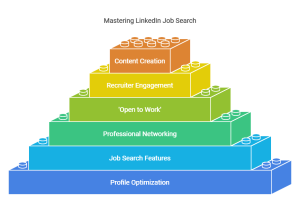
Image Courtesy: https://app.napkin.ai/
Key Take-Aways
- Know how to optimize your LinkedIn profile for a job search.
- Know the strategic networking techniques.
- Know hidden opportunities via LinkedIn tools.
- Come out with more confidence and contact recruiters directly.
- Know how to write winning applications.
- Build a sustainable job search strategy.
- Optimise Your LinkedIn Profile for Searchability.
Your LinkedIn profile isn’t just a résumé—it’s your digital first impression. Hiring managers use keywords to find candidates. Does your profile scream, “Pick me”?
Optimise Your Profile:
-
- Use Keywords Wisely: Sprinkle industry-specific terms throughout your profile. For example, if you’re in marketing, include “SEO,” “content strategy,” or “analytics.”
- Professional Headline Matters: “Marketing Specialist | SEO Expert | Content Strategist”, not “Looking for opportunities.”
- Skills Section: Add skills that are being searched by the recruiters in the niche.
- Customised URL: Replace the random numbers that exist in your URL with your name, like this, linkedin.com/in/YourName
- Example: A software engineer, Sarah added “Python”, “Cloud Computing” and “DevOps” to her profile. After two weeks, she was popping up on more recruiter searches.
Unlock LinkedIn’s Job Search Feature
LinkedIn job search is not just the search bar; it’s a goldmine if you know how to use it.
Job Search Tips
- Configure Job Alerts: Receive alert for new job postings that match what you are looking for.
- Using Advanced Filters: Search by location, experience, and industry.
- Pro Search: Boolean searches like “Marketing AND Analytics” or “Software OR Web Developer.”
- Easy Apply for Jobs: Apply directly from the site with no hassle at all.
Pro tip: Save jobs to review later. Research shows applicants who apply within 24 hours of a post have much better chances of being hired.
Network Like a Pro
Networking is never about sending some generic “Let’s connect” messages. It is about a real relationship.
How to Expand Your Network
-
- Participate in Posts: Comment on posts by your industry leaders
- Join in LinkedIn Groups : Participate in the groups about your industry
- Send a Personalised Message: State why you admire working and what you would learn from them.
Example: James, graphic designer had connected with the creative director and commented on one of the posts. He was soon referred for the role of designer by the same referral.
Use LinkedIn’s ‘Open to Work’ Feature
Activating the “Open to Work” feature tells recruiters you’re available—without broadcasting it to your current employer.
Here’s how to do it:
- Click “Open to Work” on your profile.
- Include job titles, locations, and preferences.
- Visibility set to “Recruiters only” for privacy.
Why it works: When recruiters search for talent, LinkedIn’s algorithm promotes the profiles with this feature.
Connect Directly with Recruiters and Hiring Managers
Sending a direct message to a recruiter may seem intimidating, but it works wonders. Be polite, concise, and straightforward.
Crafting the Perfect Message:
- Personalize: Mention the role and how your skills apply.
- Add a value proposition: Share a quick example of how you’ve solved a similar problem.
- End with a call-to-action: Request to speedily chat or seek advice.
Example Message:
Hello [Name of Recruiter], noticed your posting for the Marketing Specialist position at [Company]. 3+ years content strategy, a 50% organic boost to prove it, love to bring this to the team. Can we connect for a quick chat?
You don’t need to be a content creator to share valuable insights. The more you post, the more visibility you get and the more of an industry expert you are considered.
Easy Content Ideas
- Industry trends or insights.
- Talk about a project you finished.
- Lessons from the last course or conference.
Example: Priya is a data analyst. She did weekly posts on visualising data. A tech startup contacted her after noticing her content.
Why These Strategies Work
LinkedIn is more than a platform- it’s a career accelerator. Here’s why these strategies work:
| STRATEGY | WHY IT WORKS |
| Profile Optimisation | Increases discoverability in recruiter searches |
| Smart Job Search | Saves time and targets relevant opportunities |
| Networking | Builds meaningful connections for referrals |
| Open to Work Feature | Signals availability discreetly |
| Direct Outreach | Bypasses competition with personalised communication |
| Content Creation | Showcases expertise and attracts inbound opportunities |
Final Words
Finding a job on LinkedIn is an art and a science. It is the ability to present the best self, network authentically, and use all features smartly.
With these six strategies, you will land not only interviews but also impress the hiring managers even before meeting them.
So what do you wait for? Update your profile, and enable those alerts so job offers just roll in. That is how close your dream job is.